Checking account info on Biometric Wallet
You can review the account information synchronized with the mobile app directly on the Biometric Wallet.
Even when the Biometric Wallet is not synchronized with the mobile app, you can still check basic account information for each coin on the device itself.
Check account info
The device's main screen lists your coin accounts. Select an account to view its details.
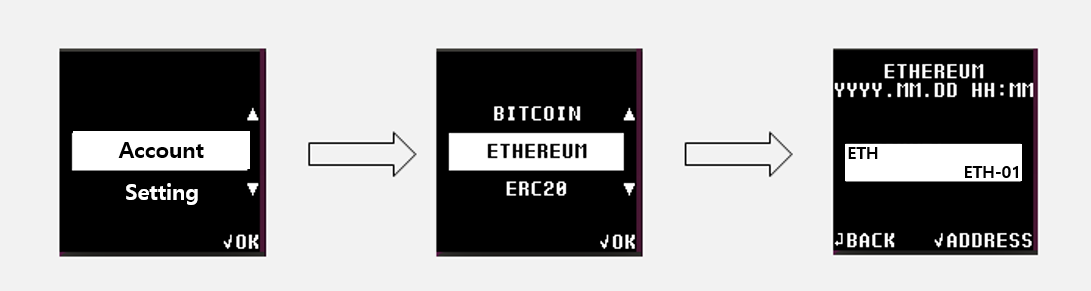
- For more information on how to create an account, please see here.
- For more information on synchronizing between Biometric Wallet and mobile app, please see here.
The date and time shown in the account info reflect when the most recently added coin account was created.
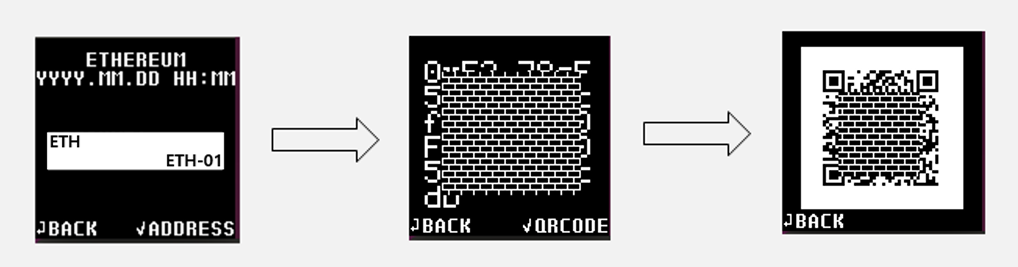
Check account address
Even without the mobile app, you can view a coin account's address — including its QR code — directly on the Biometric Wallet.
Deleting account info on the Biometric Wallet
If you have many unused accounts and want to clean them up, follow the steps below. Note: this removes information for all accounts at once.
1) On your Biometric Wallet, go to Setting > Security > Delete Account.
2) Enter your PIN, then press the OK button on the warning message to confirm. All account information is now deleted.
3) Synchronize with the mobile app, and you'll see that no accounts appear on the app's screen.
Delete Account does NOT remove the private keys for your coin accounts. They remain safely protected inside the Biometric Wallet.
You can re-add any accounts you'd like to see again from the mobile app at any time.