How to use Binance Smart Chain account
DCENT Wallet supports Binance Smart Chain (BSC) and BEP20 tokens.
BSC and BEP20 are supported on Biometric Wallet firmware v2.6.0 or higher and on DCENT Mobile App v5.1.0 or higher.
What is Binance Smart Chain?
Binance Smart Chain brings programmability and interoperability to Binance Chain. It uses 21 validators with Proof of Staked Authority (PoSA) consensus to provide short block times and low fees, supports EVM-compatible smart contracts, and enables cross-chain transfers.
How to set up DCENT Wallet
Download the latest DCENT Mobile App here:
👉 For Android
👉 For iOS
If your Biometric Wallet is running an older firmware, update it to v2.6.0 or higher from the official firmware update site.
👉 Official Firmware Update Site
You can also find a fully detailed instructions guide below.
👉 Firmware update user guide
How to add a Binance Smart Chain account in DCENT Wallet
Open the DCENT Mobile App and authenticate to unlock it.
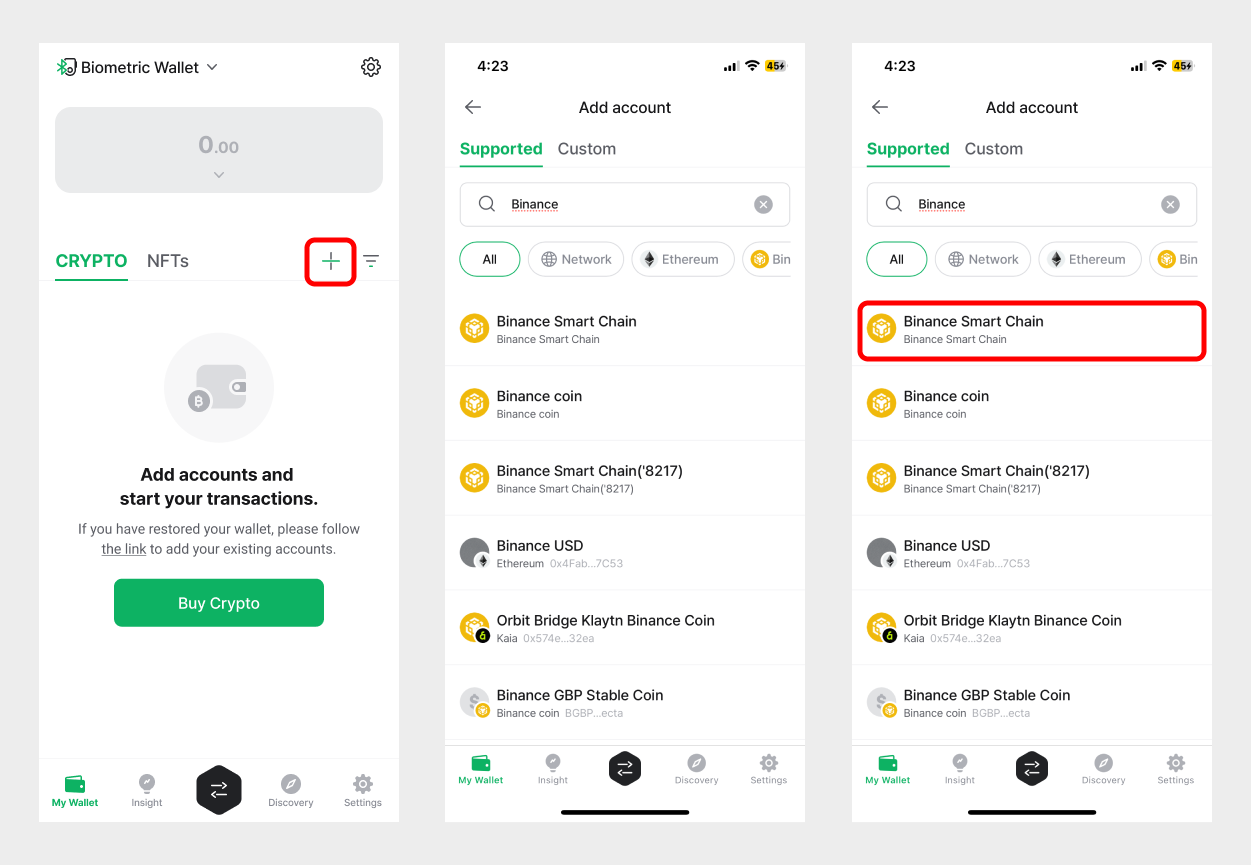
1) On the My Wallet tab, tap the (+) button to add a new account.
2) Type Binance into the search field.
3) Select Binance Smart Chain from the results.
.png)
4) Tap Create to continue.
5) Your new Binance Smart Chain account now appears on the My Wallet tab.
How to access Binance Smart Chain dApps from the built-in dApp browser
You can access dApp services using the built-in dApp browser on the Discovery tab.
-c5635d9f5fb5c9be08399dae762df419.png)
1) Go to the Discovery tab in the bottom menu.
2) Tap the network icon (🌐) in the top-right corner.
3) Switch the network to Binance Smart Chain.
4) Enter a dApp URL in the search field to open it.
Useful Link: List of Binance Smart Chain Dapp Services
👉 https://dappradar.com/rankings/protocol/binance-smart-chain