Sending XLM using DCENT Wallet
Enter the receiver address and the Memo
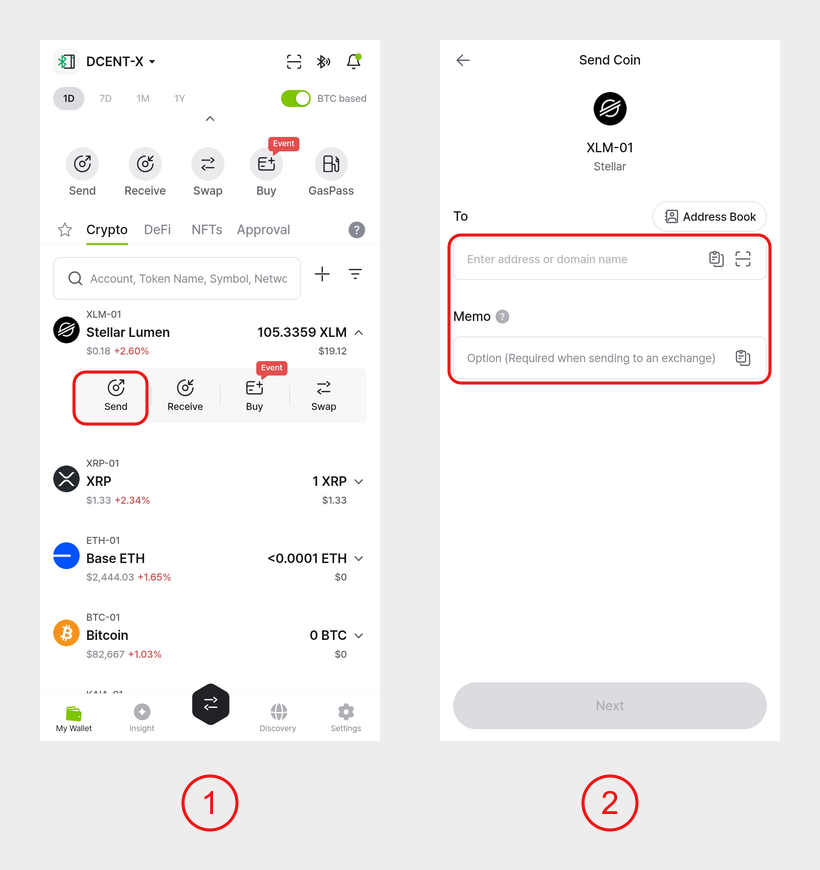
1) In the mobile app, tap the Stellar (XLM) account you want to use to expand it, then tap Send.
2) Enter the recipient's wallet address in the To field. If you are sending to an exchange address, also enter the Memo.
warning
When sending XLM to an exchange address, you MUST enter the Memo. Otherwise the exchange cannot credit your deposit.
If you send XLM to an exchange address WITHOUT a Memo, the funds may be lost permanently.
info
A Memo is not required when sending to a self-created Stellar address such as a DCENT Wallet address. If the recipient gives you a Memo, enter it.