Mobile App introduction
From a single DCENT mobile app, you can choose between the Biometric Wallet, the Card Wallet, and the App Wallet (Software).
The mobile app also makes it easy to manage your crypto assets. You can add coin accounts, view your full portfolio on a single screen, and send or receive coins directly from the app.
Mobile App download
For Android
You can install the DCENT mobile app directly from the Google Play Store. Just search for "DCENT Wallet".
Or click here to open the Play Store page directly.
.png)
For iOS
You can install the DCENT mobile app directly from the App Store. Just search for "DCENT Wallet".
Or click here to open the App Store page directly.
.png)
Main features
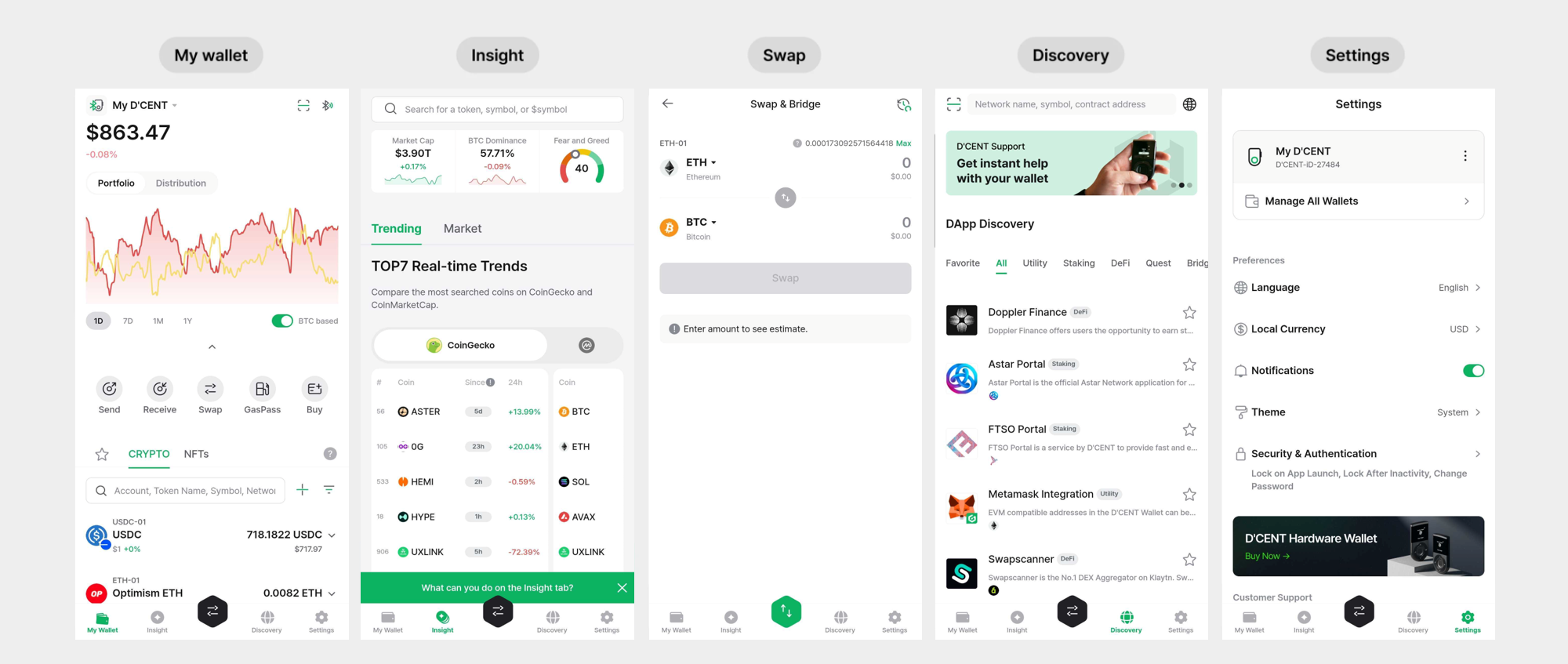
My Wallet: View your existing coin accounts or add new ones. Send and receive coins, check transaction history, and manage your assets at a glance. Tap the "NFTs" tab to see every NFT stored in your wallet on one screen.
Insight: Check live coin prices and market trends, and compare prices across different platforms.
Swap: Trade the assets you want, including cross-network swaps.
Discovery: A built-in DApp browser for Web3 services such as DeFi, DEX, and NFT marketplaces. Connect your DCENT wallet by entering a URL in the search bar, running a Google search, or picking a service from the "LIST".
Settings: Change app settings such as language, local currency, and password. You can also manage your Biometric, Card, and App Wallet types from a single place via the "Manage All Wallets" menu.