Can I cancel the pending transaction?
Due to the technical nature of blockchain networks, transactions cannot be canceled or modified once they are confirmed by the network.
If a transaction shows a Pending status, it is still waiting for confirmation by the network. Over time, it will either be confirmed or become invalid (effectively canceled). On the Ethereum, Polygon, and BSC networks, you can try to cancel a transaction before it is processed using the Cancel transaction feature below.
In some cases, if a transaction remains in "Pending" status for an extended period, it may be automatically dropped by the network, depending on network conditions.
[Use the Cancel transaction feature (Ethereum, Polygon, BSC)]
On the Ethereum, Polygon, and BSC networks, you can try to cancel a transaction that is still being processed with the Cancel transaction feature in the DCENT app. It submits a new transaction that sends 0 of the network coin (ETH, POL, or BNB) to your own address with a higher fee, so that it is processed instead of the original one. Because it sends a new transaction, a fee applies.
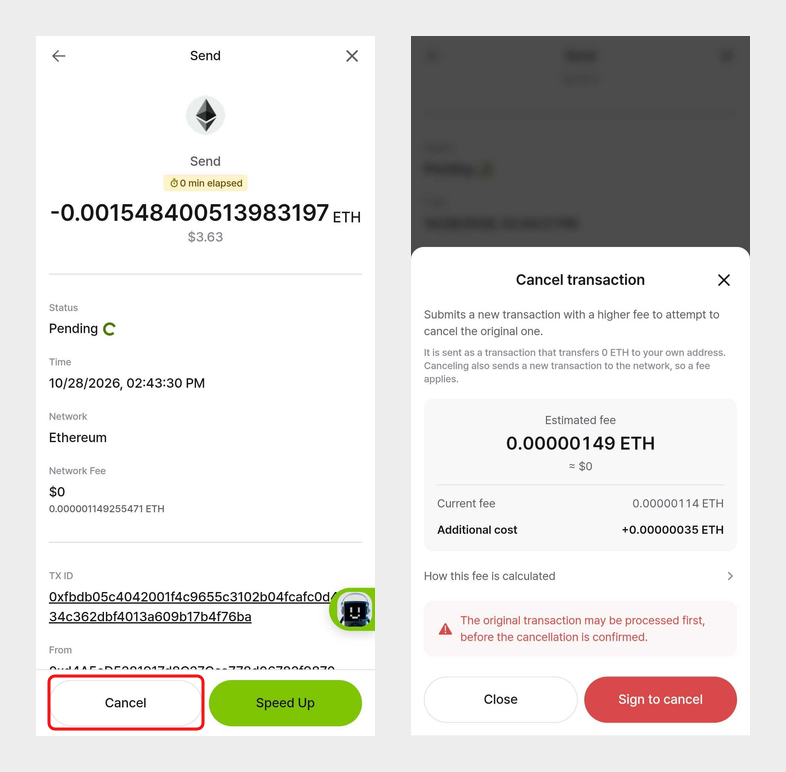
- In the [My Wallet] tab, select the coin (or token) account you sent from, then tap the transaction that is still being processed.
- Tap [Cancel] at the bottom of the transaction details screen.
- Check the estimated fee (current fee + additional cost) and tap [Sign to cancel]. For DCENT X, Biometric, and Card wallets, confirm the signature on the device.
- The details screen shows that the cancellation has been requested, and it changes to canceled once the network processes it.
- Supported wallets: DCENT X, Biometric Wallet, DCENT S Card Wallet, All-in-One Card Wallet, App Wallet (not supported on the PC Extension Program)
- Supported app version: 10.0.0 or later
- Eligible transactions: Only coin and token transfers sent with [Send] in the app. Swaps, token approvals, NFT transfers, and transactions signed in a dApp do not show the button.
- You need enough coin balance to pay the cancellation fee. Even when canceling a token transfer, the fee is paid in the network coin such as ETH, POL, or BNB.
- If an earlier transaction from the same account is still being processed, you can still request cancellation, but it will be executed only after the earlier transaction is processed.
- If the original transaction is processed before the cancellation is confirmed, it will not be canceled and the original transaction will be completed.
- If the original transaction has already been processed when you tap the button, the message "The original transaction is already processed" appears. In this case, there is no need to cancel it.
- If you don't see the [Cancel] button, the network is not supported or the transaction is not eligible.
[Checking history after canceling a token transfer]
When you cancel a token transfer, the cancellation transaction is recorded in the transaction history of the coin account (ETH, POL, or BNB), not the token account. The token account only shows the original transaction as canceled.
❓Related question