Can I add a network (chain) that is not in the list?
Even if a network is not in the DCENT default list, you can add it yourself with the Custom Networks feature in the DCENT mobile app, as long as it is an EVM-compatible network. (DCENT Mobile App v10.0.0 or later; enable it in Settings > Laboratory.)
- To add a network, you need to enter network information such as the Chain ID and RPC URL.
- You can find this information on sites such as Chainlist or on the network's official project website.
- Non-EVM networks, such as Bitcoin-based networks or Solana, cannot be added.
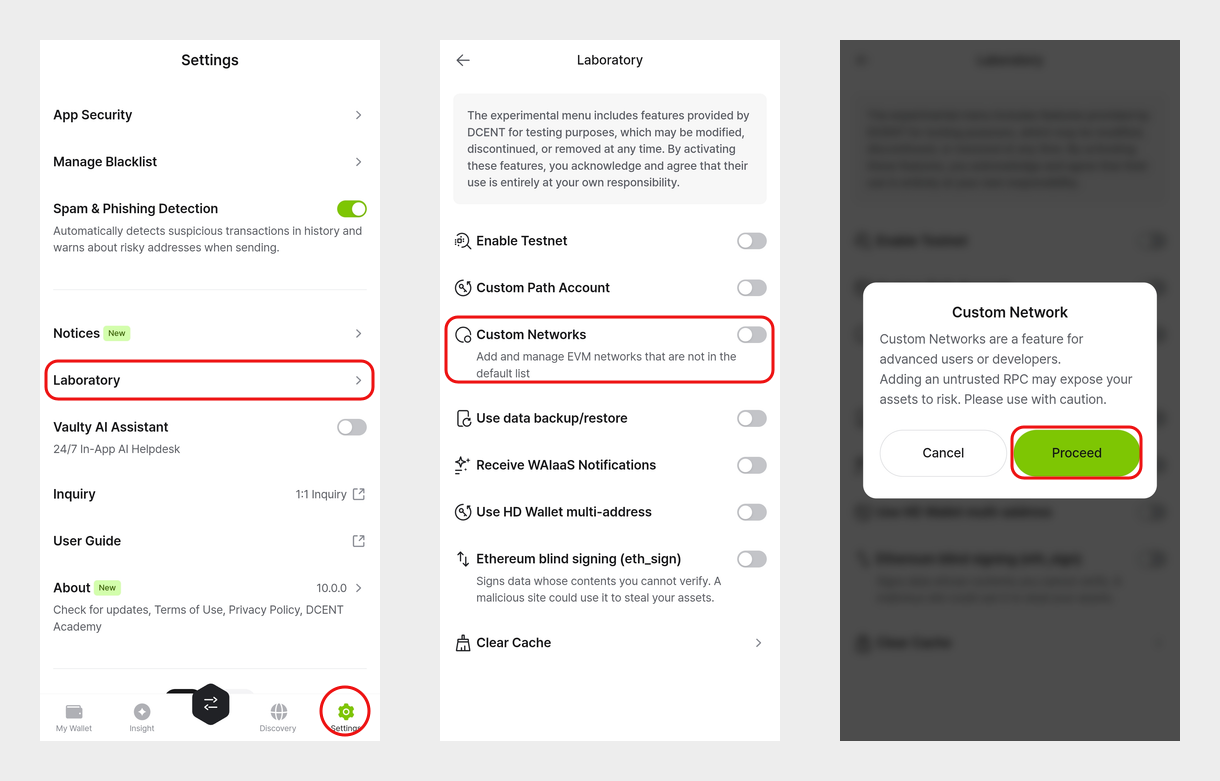
warning
Custom Networks is a Laboratory feature for advanced users. Adding an untrusted RPC may expose your assets to risk, so only enter information you have verified on the official project website. Networks you add yourself are not officially supported by DCENT, and prices or asset values may not be displayed.
Go to the guide: How to add a custom network
[Request a network to be added to DCENT]
If you would like DCENT to officially support a network, please submit a request through the Coin Request form.