Buy
The Buy service lets you purchase cryptocurrency directly with fiat money — such as USD, EUR, or JPY — using your credit or debit card, without going through a separate exchange.
DCENT Wallet's Buy integrates with multiple third-party on-ramp providers and automatically compares their quotes so you can pick the best rate. The purchased crypto is delivered straight to your DCENT wallet account.
The Buy service is available only in certain regions, so the Buy button may not appear in your app. If you have any questions, please contact us.
How to buy cryptocurrency
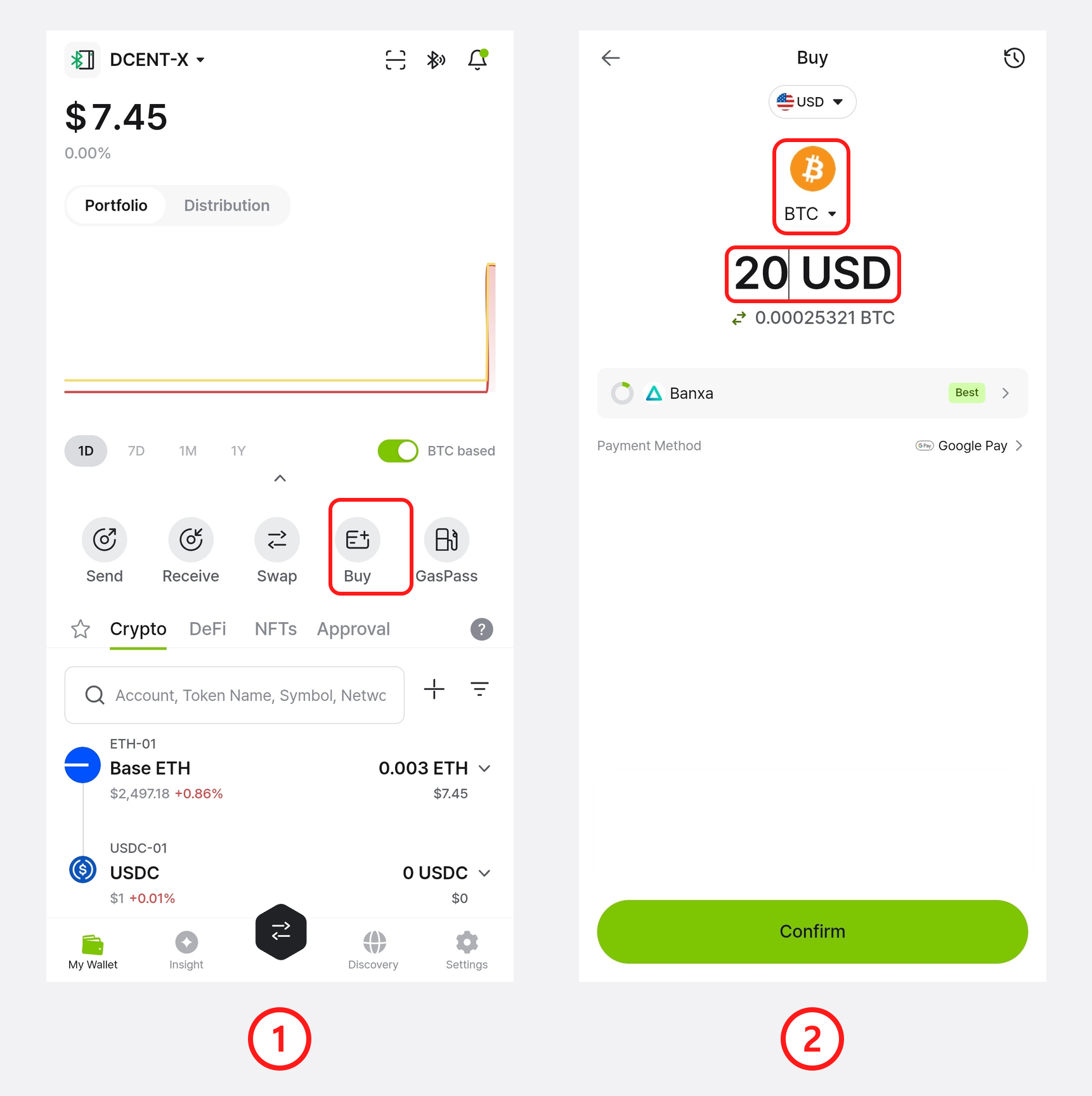
1) In the DCENT app, on the My Wallet tab, tap the Buy button in the quick-action row.
2) Tap the token selector (BTC) to choose the cryptocurrency you want to buy, then enter the amount you want to spend.
Quotes are refreshed automatically about every 30 seconds (shown by the circular timer next to the provider), so the amount you receive may change slightly.
3) From the Buy Token list, select the cryptocurrency you want to purchase. If you pick a token from the Supported token section (one you don't have an account for yet), tap Add Token first to create the account in your wallet, then continue.
4) (Optional) Use the network chips at the top of the list to narrow the tokens shown. The receiving network is determined by the account or token you selected in step 3 — so to receive on a different network, add an account on that network first.
5) By default, you pay in USD. To pay with a different fiat currency, tap the currency selector and choose one from the Local Currency list.
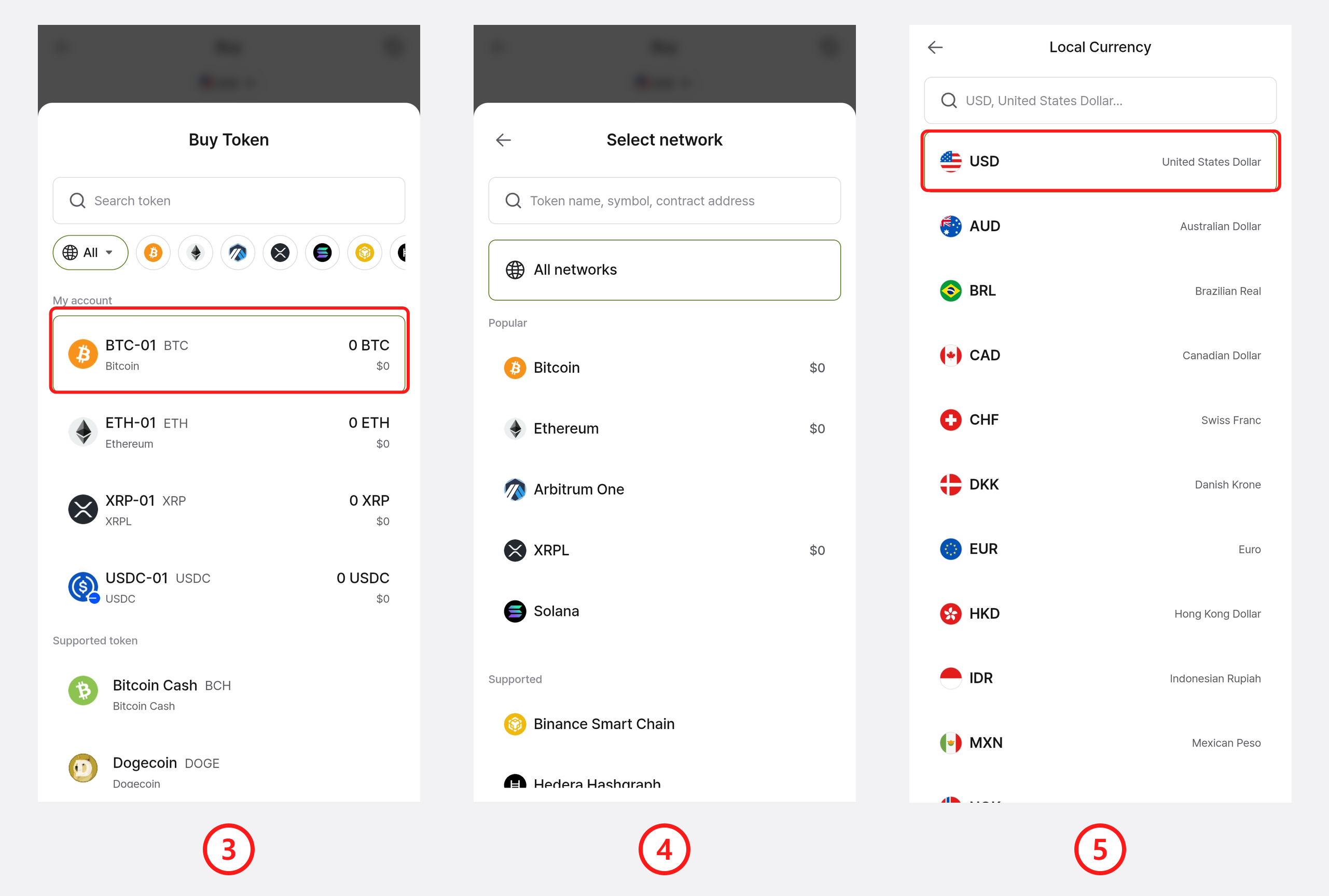
Each network has its own minimum purchase amount. If the amount you enter is below that minimum, the app shows the required amount.
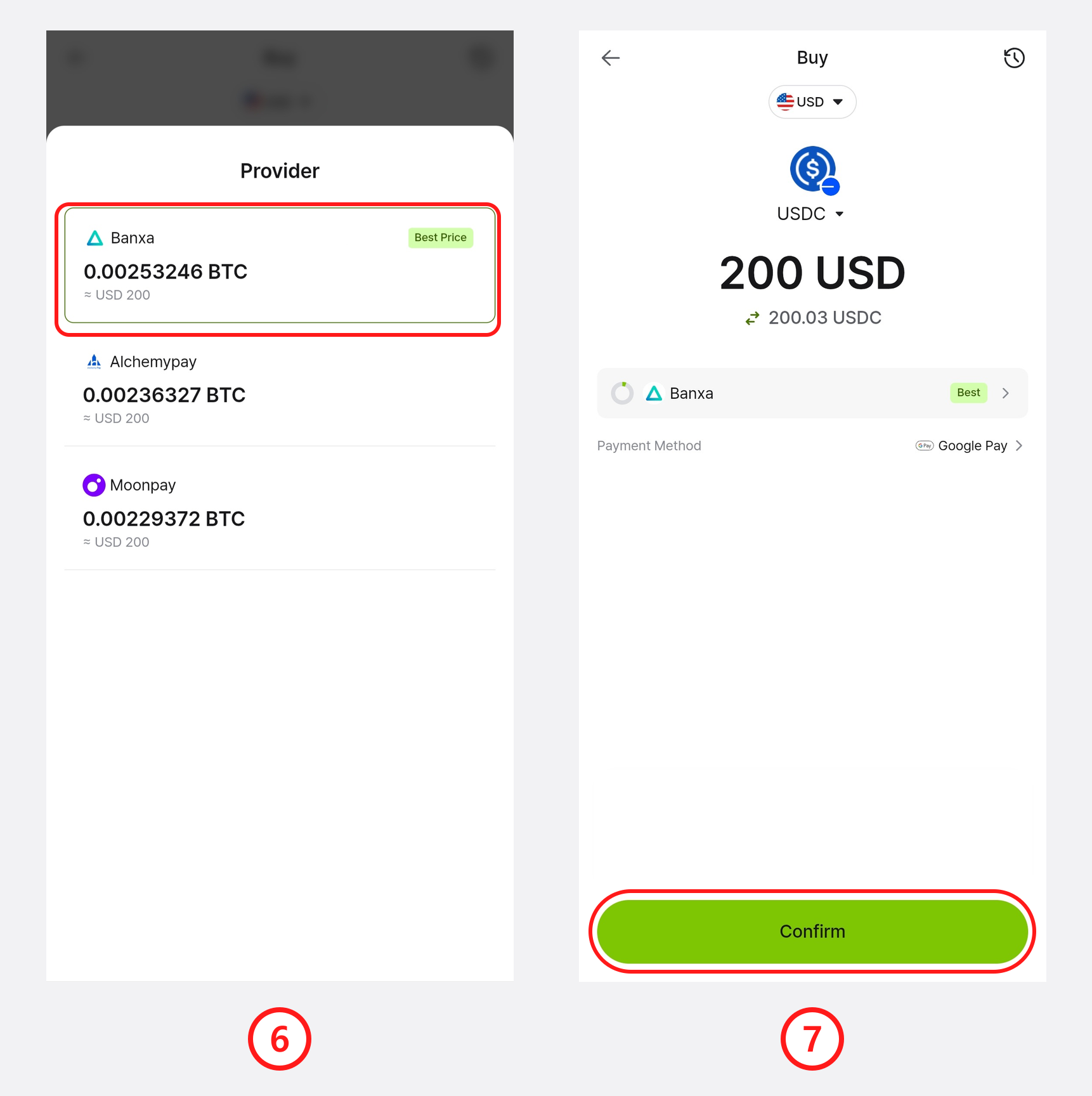
6) DCENT compares quotes from the available providers and marks the one offering the best price. Select the provider you want to use.
The recommended provider and the list of available providers can differ depending on the amount you entered. If you change the amount, the quotes and the best-price provider may change as well.
7) Review the amount you will receive, the selected provider, and the payment method, then tap Confirm. Detailed fees are shown on the provider's checkout page in the next step.
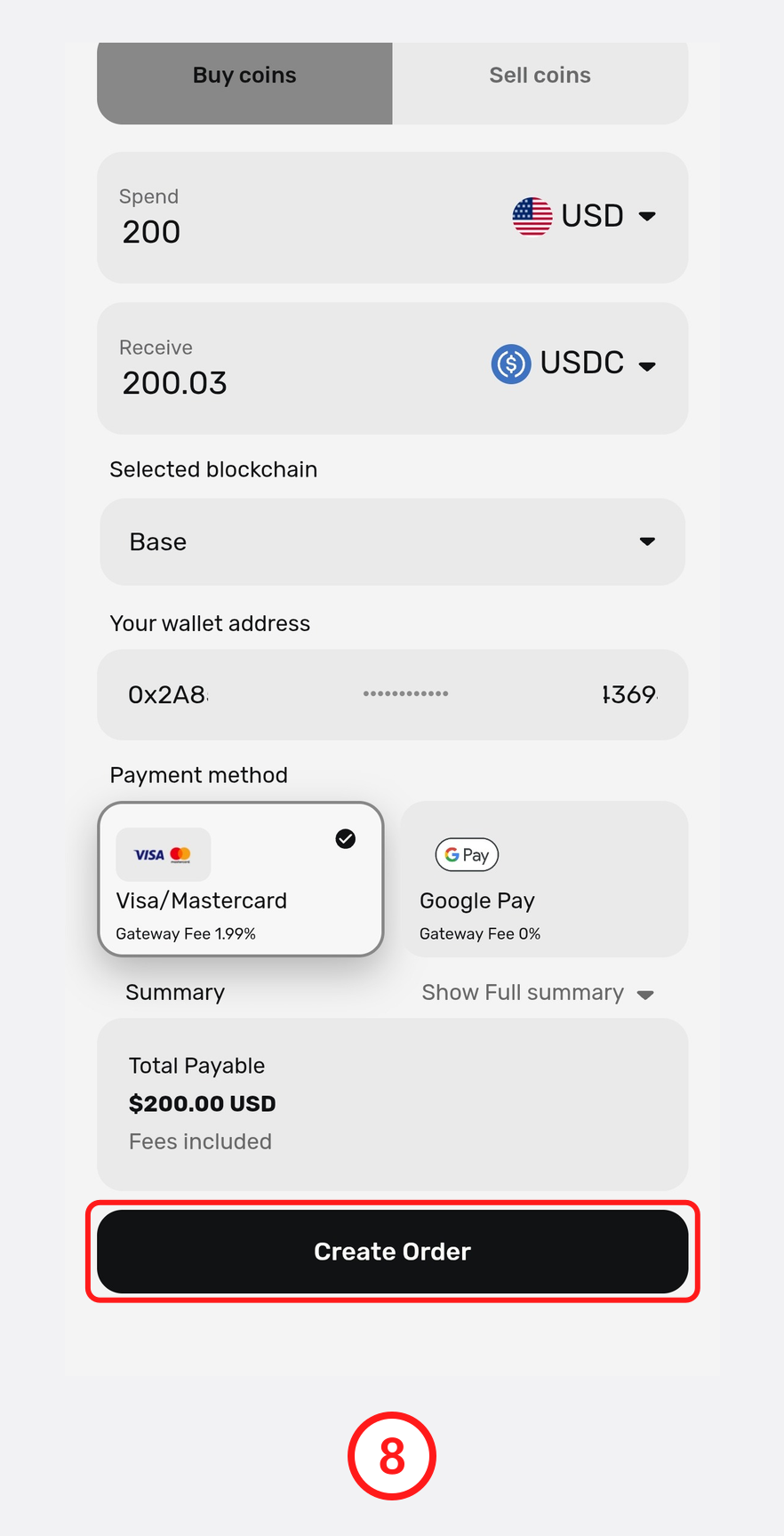
8) You are redirected to the selected provider's secure checkout page. Enter your email, choose a payment method, and complete the payment by tapping Create Order. Since identity verification (KYC) is handled by the provider, follow the provider's checkout page for any required verification.
The checkout screen looks different for each provider, but before you pay, always make sure to check the following:
- The amount to pay and the quantity of coin you will receive
- The network the coin will be delivered on
- Your DCENT wallet address that will receive the purchased coin
- The fees (provider/gateway fee, network fee)
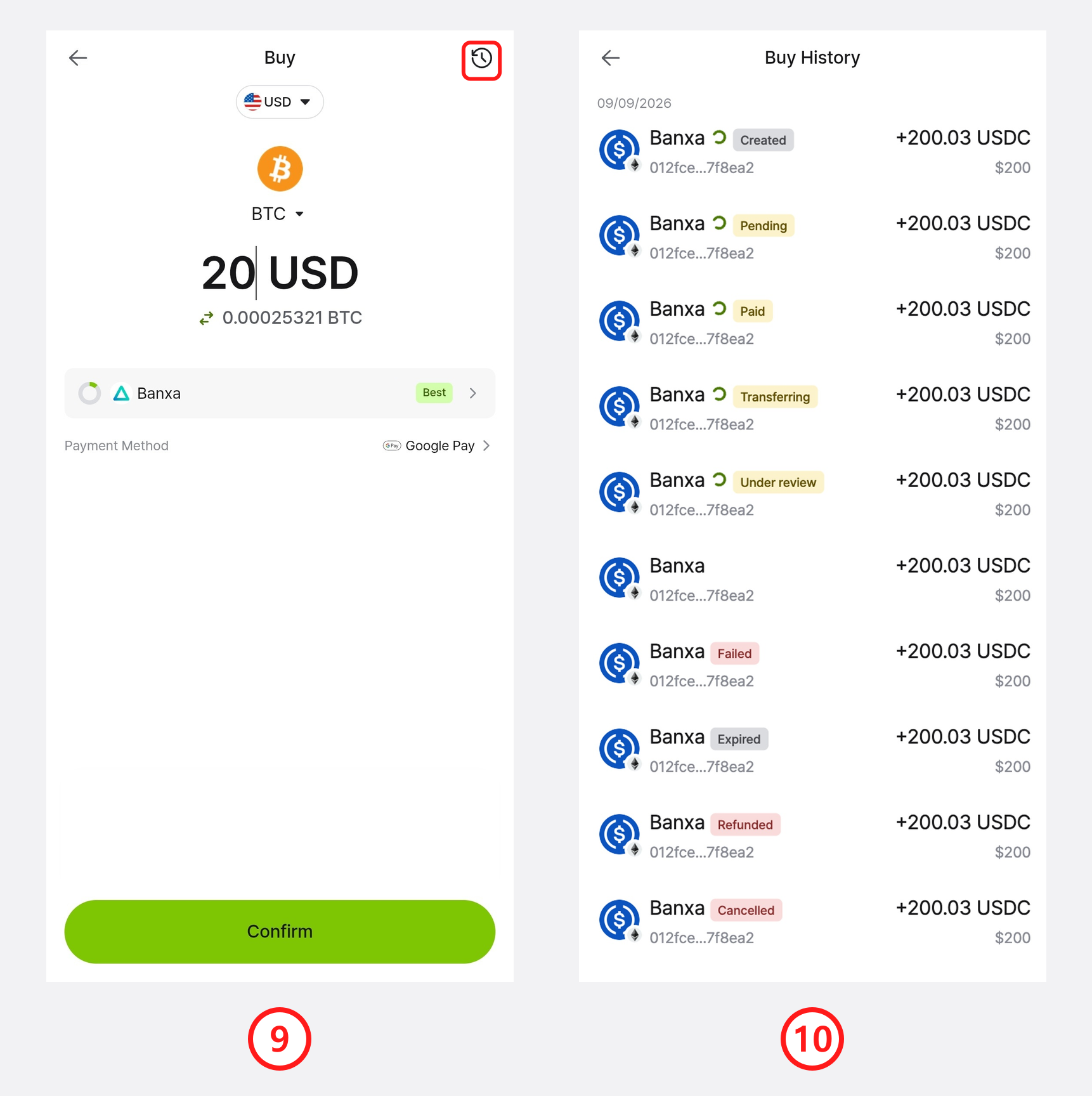
9) Once the payment is complete, the purchased crypto is delivered to your wallet. To review your orders, tap the clock icon at the top-right of the Buy screen to open your Buy History.
10) Buy History lists all of your purchases. Each order shows a status such as Completed, Pending, Under review (the provider is still reviewing your order), Expired (the payment session timed out), Refunded, or Failed.
Supported providers, payment methods, currencies, and networks
- Providers: Banxa, Alchemy Pay, MoonPay
- Payment methods: Credit or debit card
- Payment currencies: 30+ fiat currencies, including USD, EUR, GBP, JPY, AUD, CAD, CHF, SGD, HKD, TWD, THB, and more
- Supported networks: Bitcoin, Ethereum, Arbitrum One, XRPL, Solana, Binance Smart Chain, Hedera, and more
Availability may be limited by your region and by your card issuer's policy. Depending on where you are located and the policies of your bank or card company, some providers, payment methods, or currencies may not be available, and a purchase may be declined. If a payment fails, try a different provider, or check with your card issuer.
DCENT Wallet only provides an interface that connects you to third-party on-ramp providers (Banxa, Alchemy Pay, MoonPay). Payment processing, identity verification (KYC), refunds, and delivery of the purchased crypto are handled entirely by the provider. DCENT is not directly responsible for issues arising from these third-party services. For any questions about a payment or an order, please contact the relevant provider's support.