Check blockchain network of sent assets
Check in the DCENT supported coin list
Search for the mistransmitted asset in the DCENT supported coin list to see whether it is an Ethereum-based or a Kaia-based asset.
DCENT supported coin list: https://store.dcentwallet.com/pages/supported-coins-and-tokens
- If "Ethereum" is shown below the coin name: it is an Ethereum-based asset.
- If "Kaia" is shown below the coin name: it is a Kaia-based asset.
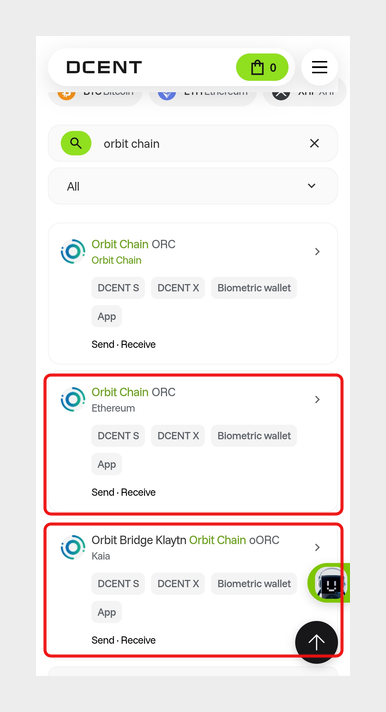
For example, searching for "orbit chain" shows both ORC and oORC. "Orbit Chain ORC" marked "Ethereum" is an Ethereum-based asset, and "Orbit Bridge Klaytn Orbit Chain oORC" marked "Kaia" is a Kaia-based asset.
Search the transaction ID (TXID) in a block explorer
For a more accurate check, search the transaction ID in a block explorer. A block explorer is a website where you can look up information recorded on a blockchain.
You can find the transaction ID (TXID) in the transfer history of the wallet that sent the asset. Search this ID in a block explorer to see which blockchain the asset belongs to.
- Ethereum block explorer: https://etherscan.io/
- Kaia block explorer: https://kaiascan.io/
If the transaction is found on the Ethereum block explorer, the asset is Ethereum-based. If it is found on the Kaia block explorer, the asset is Kaia-based.
Recover mistransmitted assets
If you mistransmitted an Ethereum-based asset, refer to the guide below.
If you mistransmitted a Kaia-based asset, refer to the guide below.
You are solely responsible for any outcome that may occur while resolving a mistransmission. Make sure you fully understand the related information before using this feature. If used incorrectly, you may permanently lose the mistransmitted assets.