How to revoke dApp allowances
Every crypto user should understand the concept of an "allowance" (also known as an approval). In crypto, an allowance is permission you give to a decentralized application (dApp) to act on your behalf. It is important to understand the risks involved and to manage these permissions carefully.
What are dApp allowances?
A dApp allowance is permission you grant to a dApp to perform certain actions with your tokens. With this permission, the dApp can transfer your tokens, mint new ones, or carry out other operations on your behalf.
Below is an example from Etherscan showing the dApps that an Ethereum wallet has granted allowances to:
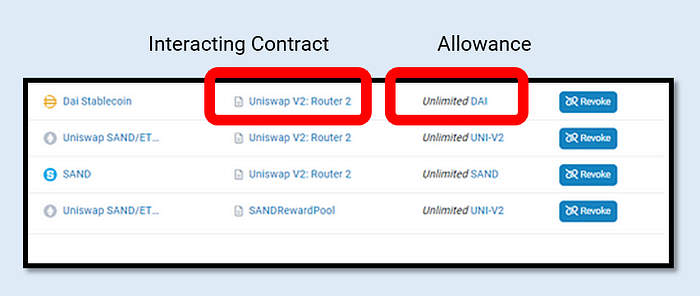
The risks of unchecked allowances
Failing to manage dApp allowances can expose you to several risks. For example:
a) Unauthorized token transfers: If a malicious dApp has access to your allowances, it can transfer your tokens without your consent, causing loss or theft.
b) Exploitation of minting permissions: Malicious dApps can use allowances to mint new tokens in your name, potentially devaluing your existing holdings.
c) Account vulnerability: Granting unrestricted dApp access can weaken account security and expose it to unauthorized control or manipulation.
Am I safe if my wallet is disconnected?
It is important to understand the difference between disconnecting your wallet from a dApp and revoking approvals or allowances. They may sound similar, but they affect dApp access in very different ways.
Disconnecting your wallet vs. revoking allowances
Disconnecting your wallet from a dApp simply cancels the dApp's permission to view information like your public address, token balances, and past activity. It limits what the dApp can see and interact with on your account.
Revoking an approval (allowance) goes further. When you revoke an approval, you cut off the dApp's ability to touch your tokens at all — the dApp can no longer retrieve or move them. Revoking is a much stronger action that fully blocks the dApp from accessing or transferring your assets.
Disconnecting your wallet limits visibility, but it does not give you the same level of security as revoking approvals.
Tips for effective permission management
a) Prevent unauthorized actions: Regularly review and revoke unnecessary allowances so dApps cannot act on your behalf without permission.
b) Protect your tokens: Revoke allowances from unused or suspicious dApps so they cannot tamper with or mint tokens linked to your account.
c) Improve account security: Good permission management reduces the risk of a malicious dApp taking over your account, protecting your privacy, control, and overall security.
How to revoke dApp approvals (allowances)
You can use trusted revocation tools such as Ethallowance, Etherscan, Cointool, Revoke, Unrekt, or EverRevoke to manage and revoke the allowances you have granted.
Note: Revoking allowances is a blockchain transaction, so network fees apply. Some revocation services may also charge an additional fee.
Example: revoking an allowance using Etherscan (Ethereum)
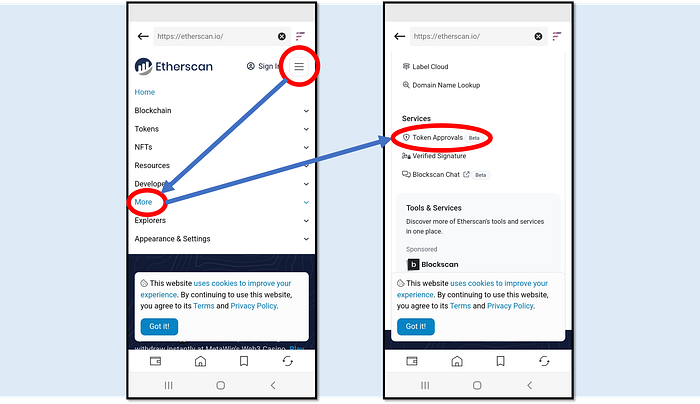
Revoking dapps allowances using DCENT Wallet from the Etherscan platform (1)
From the Discovery tab (the DApp browser) in DCENT Wallet, open Etherscan (https://etherscan.io) and tap Token Approvals under the Services menu.

Revoking dapps allowances using DCENT Wallet from the Etherscan platform (2)
Tap Connect to Web3 and choose MetaMask to trigger a wallet connection in DCENT Wallet.
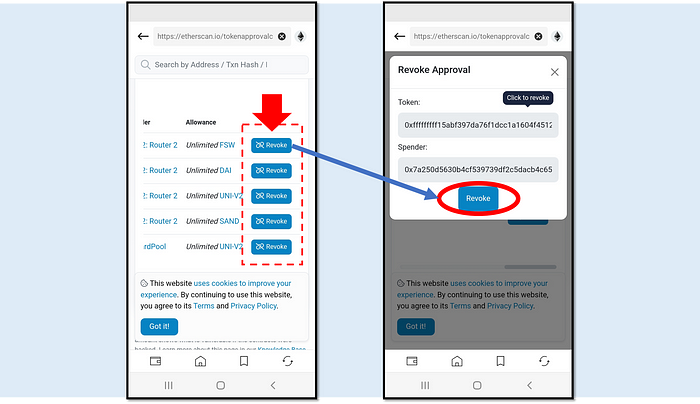
Revoking dapps allowances using DCENT Wallet from the Etherscan platform (3)
You will see the tokens and dApps that have been granted allowances. Tap the blue Revoke button to revoke an allowance.
Example: revoking allowances with Revoke.cash (multichain)
If you use dApps across multiple networks, Revoke.cash is another excellent third-party tool.
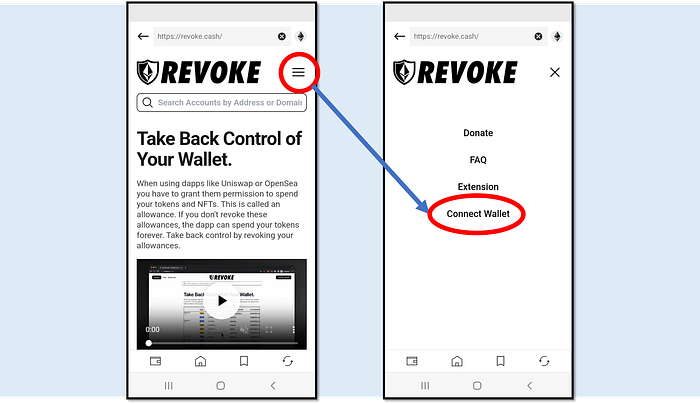
Revoking dapps allowances using DCENT Wallet from the Revoke Cash platform (1)
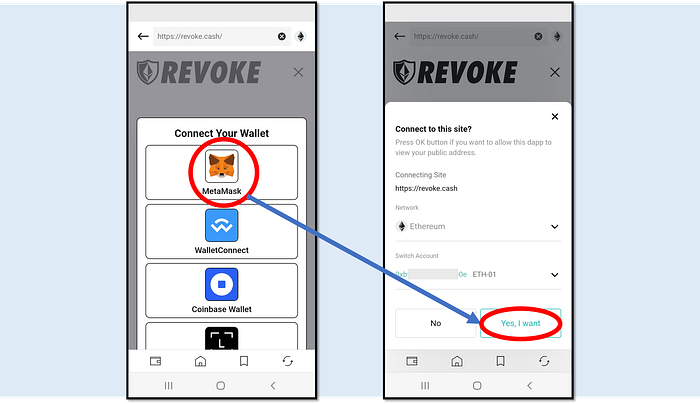
From the Discovery tab (the DApp browser) in DCENT Wallet, open Revoke.cash (https://revoke.cash). Open the main menu and tap Connect Wallet.
Revoking dapps allowances using DCENT Wallet from the Revoke Cash platform (2)
Tap MetaMask to trigger a wallet connection with DCENT Wallet.
Revoking dapps allowances using DCENT Wallet from the Revoke Cash platform (3)
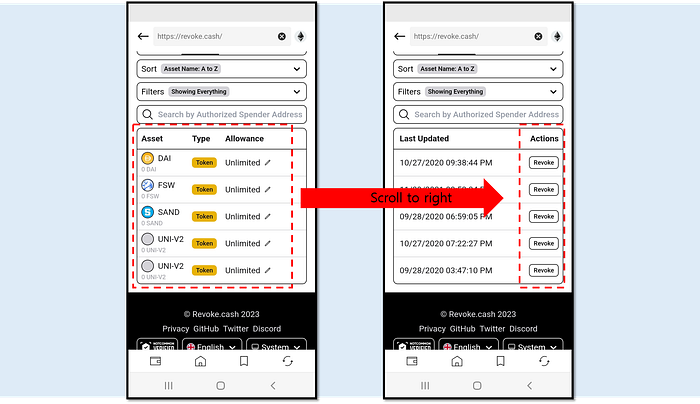
Once connected, you can see your token assets and the allowances you have granted to smart contracts. Scroll right to find the Revoke buttons under the Actions menu.